

Why highlight Biblical Terms in the target text?
DHDoug Higby · Mar 18, 2016, 3:51 PM · Last modified: Sep 28, 2026, 11:37 AM
♡ 0
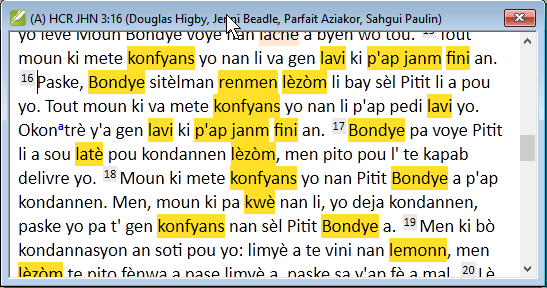
Paratext 8 (and earlier test versions) allow you to turn highlighting of Biblical terms on and off for the target text. While this is cool technology, I fail to see the use case. Can somebody explain to me circumstances in which this might be helpful? That will allow me to explain how and why to use it in the training materials we are developing.
5 comments
Sign in to join the conversation.
I imagine that it's supposed to be an aid for verifying that Biblical Terms are used in accordance with the plan recorded in renderings. The colour-coding helps verify that an expected rendering has been found, but that's all. So it fits into a proof-reading and team-checking part of the workflow and possibly also checking/coaching with a consultant. I am a little concerned that it may be more confusing to many than helpful but I haven't yet had teams using it. Most folk I've taught ignore all sorts of highlighting and don't attach any particular significance to it unless specifically taught to.
Maybe the person or persons who requested this feature could explain the use case that they had in mind. I am picturing the situation where the Biblical renderings window is open and Biblical terms highlighting is activated. Could it be to facilitate find a rendering from the BT rendering window in the target project?
I think this can serve as the italic print in text to highlight clear work and work for glossary. I can also allow consultant to have a glance about how teams handling Biblical term. BTW, since it can turn on and off and it's already there. I think you can just leave it there and let people to try it out there.
Good idea... So I looked in the issue database and found the original request: "As a translator or a consultant I want to be reminded when a keyterm rendering is used in a verse." And I also realized that when you hover over the highlighted word it shows the Biblical Term it is linked to in a popup window. That makes it a much more useful tool!
Another reason for the highlighting is so that the user can quickly see that there are Biblical terms in another verse. If the renderings window is open it will indicate that a term is supposed to be found in a given verse (depending no what filter is in place). However, sometimes those terms are actually found in a neighboring verse. Having the highlighting on points out the terms to make it easier to locate.